Orgmode And Tikz Diagrams
I have written a lengthy post about my usage of diagrams. This is just a short reminder to myself, that there are also LaTeX tools to generate diagrams. The TikZ tool especially is very interesting as it can do amazing stuff. I wondered how difficult it would be to use it from my setup. Turns out it isn't.
Tikz
As Tikz is a library for LaTeX, we can use the LaTeX export from org
mode. All we need to do is to ensure that the tikz package is being
used. This can be done easily in the prelude to the code block. So
here is the outline of how it looks in the source code:
#+header: :results file drawer
#+header: :file ../images-generated/ob-tikz-example.svg
#+header: :headers '("\\usepackage{tikz}")
#+begin_src latex
\usetikzlibrary{positioning}
  ....
\begin{tikzpicture}
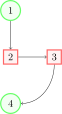
The LaTeX exporter will then happily generate the diagram for us. This example shows the actual source in orgmode and the result:
\usetikzlibrary{positioning}
\begin{tikzpicture}
  \tikzset{roundnode/.style={circle, draw=green!60, fill=green!5, very thick, minimum size=7mm}}
  \tikzset{squarednode/.style={rectangle, draw=red!60, fill=red!5, very thick, minimum size=5mm}}
  % Nodes
  \node[squarednode]      (maintopic)                              {2};
  \node[roundnode]        (uppercircle)       [above=of maintopic] {1};
  \node[squarednode]      (rightsquare)       [right=of maintopic] {3};
  \node[roundnode]        (lowercircle)       [below=of maintopic] {4};

  % Lines
  \draw[->] (uppercircle.south) -- (maintopic.north);
  \draw[->] (maintopic.east) -- (rightsquare.west);
  \draw[->] (rightsquare.south) .. controls +(down:7mm) and +(right:7mm) .. (lowercircle.east);
\end{tikzpicture}
Comments
Comments powered by Disqus