Debugging Secure Boot On A New Main-Board
This post is still in development. So please do not complain that it does not make any sense. Debugging Secureboot (Source) is a new link.
Having replaced my old main board and CPU with a new combination, I was happy that the new system came up without any problems with the same old Linux system, but of course I discovered that secure boot was not enabled by default. Having written a longish blog post about this topic some time ago I thought this should be easy, but I was wrong. Let's look at what was necessary to get it to work again.
Slow Death Of a System
My old main board started to slowly deteriorate, in other words, the
GUI froze roughly every 3-4 hours. This first happened during a video call
and as the sound kept stuttering on, I was pretty sure that the kernel
was still running, even though the machine itself was completely
unresponsive. So ssh'ing in I was able to look at the logs and found
basically always amdgpu related message sand errors together with
USB and sound errors. Here is an example:
Feb 11 13:50:23 krikkit kernel: amdgpu 0000:09:00.0: amdgpu: ring gfx timeout, signaled seq=102192035, emitted seq=102192037
Feb 11 13:50:23 krikkit kernel: amdgpu 0000:09:00.0: amdgpu: Process information: process chrome pid 1838683 thread chrome:cs0 pid 1838702
Feb 11 13:50:23 krikkit kernel: amdgpu 0000:09:00.0: amdgpu: GPU reset begin!
Feb 11 13:50:48 krikkit kernel: xhci_hcd 0000:01:00.0: Frame ID 803 (reg 6976, index 3) beyond range (875, 1767)
Feb 11 13:50:48 krikkit kernel: xhci_hcd 0000:01:00.0: Ignore frame ID field, use SIA bit instead
Feb 11 13:50:48 krikkit kernel: xhci_hcd 0000:01:00.0: Frame ID 804 (reg 6976, index 4) beyond range (875, 1767)
Feb 11 13:50:48 krikkit kernel: xhci_hcd 0000:01:00.0: Ignore frame ID field, use SIA bit instead
Feb 11 13:52:33 krikkit kernel: INFO: task kworker/u32:6:2010822 blocked for more than 120 seconds.
Feb 11 13:52:33 krikkit kernel:       Tainted: G           O       6.11.10-amd64 #1 Debian 6.11.10-1
Feb 11 13:52:33 krikkit kernel: "echo 0 > /proc/sys/kernel/hung_task_timeout_secs" disables this message.
Feb 11 13:52:33 krikkit kernel: task:kworker/u32:6   state:D stack:0     pid:2010822 tgid:2010822 ppid:2      flags:0x00004000
Feb 11 13:52:33 krikkit kernel: Workqueue: events_unbound commit_work [drm_kms_helper]
Feb 11 13:52:33 krikkit kernel: Call Trace:
Feb 11 13:52:33 krikkit kernel:  <TASK>
Feb 11 13:52:33 krikkit kernel:  __schedule+0x3ec/0xb00
Feb 11 13:52:33 krikkit kernel:  schedule+0x27/0xf0
Feb 11 13:52:33 krikkit kernel:  schedule_timeout+0x12f/0x160
Feb 11 13:52:33 krikkit kernel:  dma_fence_default_wait+0x1e5/0x260
Feb 11 13:52:33 krikkit kernel:  ? __pfx_dma_fence_default_wait_cb+0x10/0x10
Feb 11 13:52:33 krikkit kernel:  dma_fence_wait_timeout+0x108/0x140
Feb 11 13:52:33 krikkit kernel:  drm_atomic_helper_wait_for_fences+0x155/0x1e0 [drm_kms_helper]
Feb 11 13:52:33 krikkit kernel:  commit_tail+0x2f/0x130 [drm_kms_helper]
Feb 11 13:52:33 krikkit kernel:  process_one_work+0x177/0x330
Feb 11 13:52:33 krikkit kernel:  worker_thread+0x252/0x390
Feb 11 13:52:33 krikkit kernel:  ? __pfx_worker_thread+0x10/0x10
Feb 11 13:52:33 krikkit kernel:  kthread+0xd2/0x100
Feb 11 13:52:33 krikkit kernel:  ? __pfx_kthread+0x10/0x10
Feb 11 13:52:33 krikkit kernel:  ret_from_fork+0x34/0x50
Feb 11 13:52:33 krikkit kernel:  ? __pfx_kthread+0x10/0x10
Feb 11 13:52:33 krikkit kernel:  ret_from_fork_asm+0x1a/0x30
Feb 11 13:52:33 krikkit kernel:  </TASK>
First I thought it may be connected to a Linux kernel update as Debian Trixie receives kernel updates quite often and every few weeks I do reboot into a fresh kernel installed during the regular updates. So after another crash I selected the older kernel to boot but soon again saw the same hang with amdgpu related messages in the log. More crashes and a successful RAM test later I was convinced that the origin was somewhere in the graphics / main-board combination. The graphics is part of the Ryzen 2400G CPU, so I decided the most promising way forward would be to replace that main-board/CPU combination and keep everything else.
Trying to stay with my existing DDR4 DIMMs, limited the choice of new mainboards to the AM4 socket as all AM5 systems require DDR5. Checking display connections, number of SATA ports and NVMe connectors, I finally settled on the ASUS PRIME-B550M-K in combination with a Ryzen 5700G CPU. As the main-board has the same dimensions as my old one, it didn't take me long to replace the old one. Inserting the CPU and mounting the fan went smoothly once I oriented the CPU the right way 🙈. Moving the RAM DIMMS plus NVMe from the old board to the new one was also easy and after unplugging all SATA devices and front panel connectors, I fixed the new board in the old housing. And sure enough, the system came up fine after applying power. Puuh!
Not Secure Anymore
As the BIOS was not configured for Secure Boot, I went with this setting to ensure that everything was fine before re-enabling it. My thought was that simply enabling it should work without any further ado as the certificates required for GRUB should be installed by default. Of course the kernel modules compiled on my machine should fail to load as the Machine Owner Key (MOK) needs to be installed manually.
Re-Enroll the MOK
So the first thing that I tried was to enroll my existing MOK as described in my old blog post. After entering the temporary password for the MOK manager, I rebooted the machine and was amazed to find that it booted straight into GRUB again without any key management whatsoever. Hm.
Ok, so maybe I need to enable Secure Boot in the BIOS first? Doing so resulted in this embarrassingly unhelpful dead end before entering GRUB:
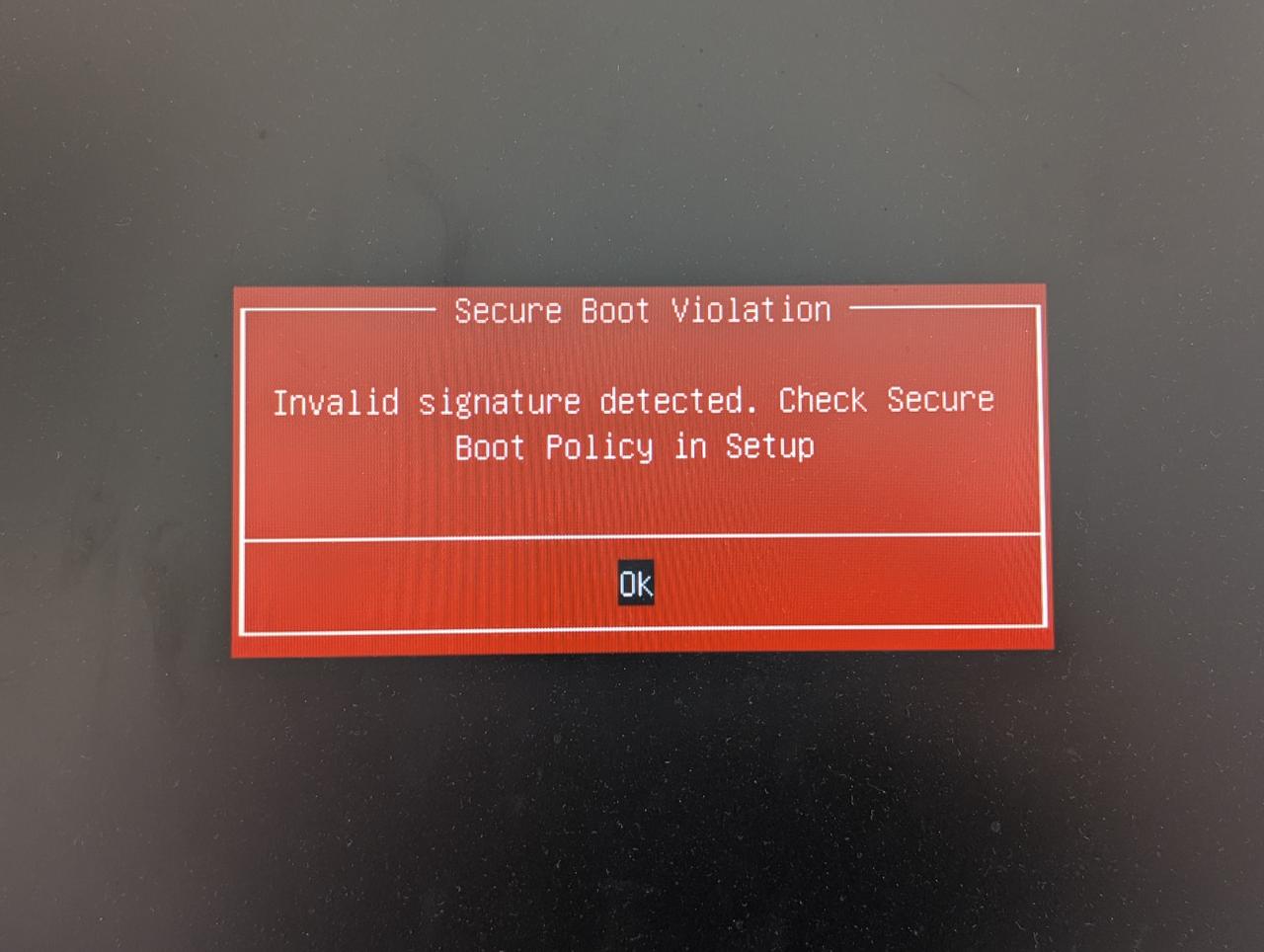
Personally I would vote not to allow the person responsible for this message to ever again get near any source code, but hey nobody asks me anyway.
Analysis
As we are not able to enter GRUB, we need to find out why the BIOS fails to verify the shim used to launch GRUB. So let's try to find out. Let's find the signatures on the shimx86 EFI application:
dzu@krikkit:~$ sudo sbverify --list /boot/efi/EFI/debian/shimx64.efi
warning: data remaining[831016 vs 957136]: gaps between PE/COFF sections?
signature 1
image signature issuers:
 - /C=US/ST=Washington/L=Redmond/O=Microsoft Corporation/CN=Microsoft Corporation UEFI CA 2011
image signature certificates:
 - subject: /C=US/ST=Washington/L=Redmond/O=Microsoft Corporation/CN=Microsoft Windows UEFI Driver Publisher
   issuer:  /C=US/ST=Washington/L=Redmond/O=Microsoft Corporation/CN=Microsoft Corporation UEFI CA 2011
 - subject: /C=US/ST=Washington/L=Redmond/O=Microsoft Corporation/CN=Microsoft Corporation UEFI CA 2011
   issuer:  /C=US/ST=Washington/L=Redmond/O=Microsoft Corporation/CN=Microsoft Corporation Third Party Marketplace Root
dzu@krikkit:~$
Ok, so let's extract our EFI certificates into their own files. For
this we first need to read the list of certificates from the db EFI
variable into a file and then use the tool sig-list-to-certs
(contained in the efitools package) to split that into separate
certificates:
root@krikkit:/tmp# mkdir certs
root@krikkit:/tmp# cd certs
root@krikkit:/tmp/certs# efi-readvar -v db -o db.efivar
Variable db, length 9312
root@krikkit:/tmp/certs# ls
db.efivar
root@krikkit:/tmp/certs# sig-list-to-certs db.efivar base
X509 Header sls=898, header=0, sig=854
file base-0.der: Guid 3b053091-6c9f-04cc-b1ac-e2a51e3be5f5
Written 854 bytes
X509 Header sls=889, header=0, sig=845
file base-1.der: Guid 3b053091-6c9f-04cc-b1ac-e2a51e3be5f5
Written 845 bytes
X509 Header sls=1600, header=0, sig=1556
file base-2.der: Guid 77fa9abd-0359-4d32-bd60-28f4e78f784b
Written 1556 bytes
X509 Header sls=1543, header=0, sig=1499
file base-3.der: Guid 77fa9abd-0359-4d32-bd60-28f4e78f784b
Written 1499 bytes
X509 Header sls=1124, header=0, sig=1080
file base-4.der: Guid 6dc40ae4-2ee8-9c4c-a314-0fc7b2008710
Written 1080 bytes
X509 Header sls=1492, header=0, sig=1448
file base-5.der: Guid 77fa9abd-0359-4d32-bd60-28f4e78f784b
Written 1448 bytes
X509 Header sls=1498, header=0, sig=1454
file base-6.der: Guid 77fa9abd-0359-4d32-bd60-28f4e78f784b
Written 1454 bytes
SHA256 Header sls=268, header=0, sig=32
file base-7.hash: Guid 00000000-0000-0000-0000-000000000000
Written 32 bytes
SHA256 Header sls=268, header=0, sig=32
file base-8.hash: Guid 00000000-0000-0000-0000-000000000000
Written 32 bytes
SHA256 Header sls=268, header=0, sig=32
file base-9.hash: Guid 00000000-0000-0000-0000-000000000000
Written 32 bytes
SHA256 Header sls=268, header=0, sig=32
file base-10.hash: Guid 00000000-0000-0000-0000-000000000000
Written 32 bytes
SHA256 Header sls=268, header=0, sig=32
file base-11.hash: Guid 00000000-0000-0000-0000-000000000000
Written 32 bytes
root@krikkit:/tmp/certs# ls
base-0.der    base-11.hash  base-2.der	base-4.der  base-6.der	 base-8.hash  db.efivar
base-10.hash  base-1.der    base-3.der	base-5.der  base-7.hash  base-9.hash
root@krikkit:/tmp/certs#
The signature tools expect PEM files, so let's convert the DER files:
root@zarniwoop:/tmp/certs# for f in *.der ; do openssl x509 -inform der -in $f -out ${f/der/pem} ; done
Comments
Comments powered by Disqus